> For the complete documentation index, see [llms.txt](https://docs.developer.disruptive-technologies.com/llms.txt). Markdown versions of documentation pages are available by appending `.md` to page URLs; this page is available as [Markdown](https://docs.developer.disruptive-technologies.com/concepts/usage-examples/2.gen-temperature-sensor.md).
# Temperature Measurement Interval
A quick showcase on how to interact with the sampling interval of the 2nd and 3rd generation temperature sensors.
## Overview
The 2nd and 3rd Generation Wireless Temperature Sensor both supports configuring a sampling interval that is shorter than the heartbeat interval. This enables the temperature sensor to measure the temperature as often as every 30 seconds, with only a minor impact on battery life. Like our 1st generation sensors, an event is generated every periodic heartbeat, but with the 2nd and 3rd generation hardware, the event can contain up to 30 temperature samples, depending on the configuration.
## Configuring Sampling Interval
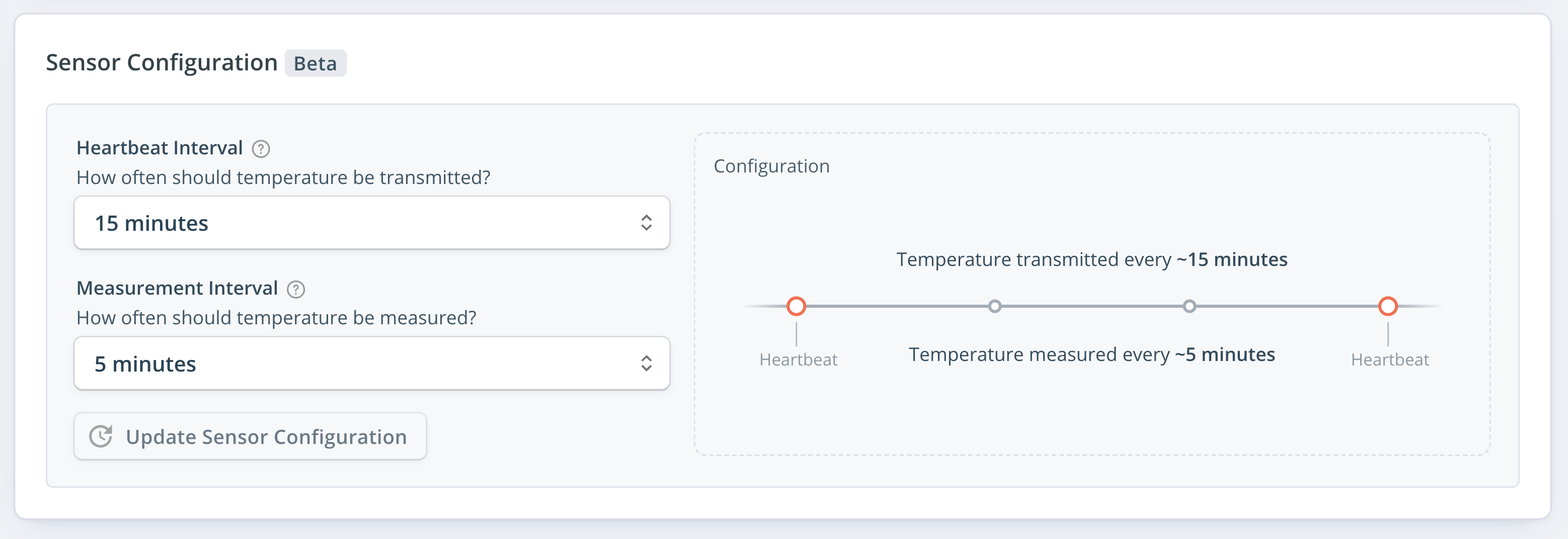
The sampling interval can be configured from Studio in the Sensor Configuration section of the device details page.
Sensor Configuration in Studio for a 2nd and 3rd Generation Temperature Sensor
API support for device configuration is coming later.
## Measurement Timeline
When the sensor is configured to sample more than 1 sample per heartbeat, additional samples are included with every temperature event as a list of timestamps and values. As shown in the [Temperature Event documentation](/concepts/events.md#temperature-event), the first element in the list is equal to the event timestamp and value, independent of configuration.
If more than 1 sample has been sampled during the period, the list is in decreasing order, meaning that the oldest sample is located at the end. The total length of the list will depend on the configuration.

## Concatenating Historic Events
A [Temperature Event](/concepts/events.md#temperature-event) has a `samples` field that will always include all the measured values since the previous heartbeat. This makes it easier to create a single sorted list of all the samples when [listing temperature events](https://developer.disruptive-technologies.com/api#/Event%20History/get_projects__project__devices__device__events) through the API.
{% tabs %}
{% tab title="Python API" %}
The following snippet shows how to unpack a list of historic temperature events fetched using our Python API. A full example can be found [here](https://developer.disruptive-technologies.com/api/libraries/python/client/examples/2nd_gen_temperature_sensor.html).
```python
samples = []
for event in events:
samples += event.data.samples
```
{% endtab %}
{% endtabs %}
## Publishing Emulated Events
Temperature events from the 2nd and 3rd Generation Wireless Temperature Sensor can be generated without access to physical sensors using the [Emulator API](/sensor-emulator.md).
{% tabs %}
{% tab title="DT Studio" %}
In [DT Studio](https://studio.disruptive-technologies.com/), click **API Integrations -> Emulator**, then select or create a temperature sensor. When selecting **Emulate sampling between heartbeats**, the feature appears.

{% endtab %}
{% tab title="Python API" %}
The [publish\_event()](https://developer.disruptive-technologies.com/api/libraries/python/client/resources/emulator.html#publish-event) method is available under the Emulator resource of our Python API. The following snippet shows an overview, and a full implementation example can be found [here](https://developer.disruptive-technologies.com/api/libraries/python/client/examples/2nd_gen_temperature_sensor.html).
```python
dt.Emulator.publish_event(
device_id="",
project_id="",
data=dt.events.Temperature(
timestamp=datetime.utcnow(),
celsius=22.3,
samples=[
dt.events.TemperatureSample(
celsius=22.3,
timestamp=datetime.utcnow(),
),
dt.events.TemperatureSample(
celsius=22.8,
timestamp=datetime.utcnow()-timedelta(seconds=30),
),
dt.events.TemperatureSample(
celsius=23.3,
timestamp=datetime.utcnow()-timedelta(seconds=60),
),
],
)
)
```
{% endtab %}
{% endtabs %}
## Sample Timestamp Accuracy
Normally, the `updateTime` of an event is set to when the Cloud Connector receives the event from the sensor. Since this is not possible for samples between heartbeats, the timestamp of these samples is estimated by DT Cloud.
The implementation of this estimation assumes an ideally distributed interval according to the configuration. For example, if the sensor is configured to 5 samples per heartbeat and it has been exactly 10 minutes since the previous heartbeat, the interval between the timestamps will be exactly 2 minutes.